Fingerbang
A honeycomb keyboard bolted to four loopers. Touch hexes to play; the lanes record whatever your fingers do and loop it — four melodies at four different lengths, drifting in and out of phase like clockwork that took up jazz. Fingerbang makes no sound of its own: it's a MIDI instrument that plays your synths, and it plays them in key, always.
Quick Start
- Load Fingerbang on a MIDI track and route its output to a synth — it is silent by design; the synth is the voice. (Standalone opens fullscreen; F11 toggles it.)
- Press PLAY — or run your DAW transport; Fingerbang follows.
- Touch a hex. The note under your finger is recorded into the playing step of the selected lane.
- Hold and move. As the playhead advances, each passing step captures whatever hex you're on — drawing across the grid draws a melody across time.
- Release. The lane keeps looping what you drew.
- Switch lanes and layer. Four lanes, four channels, four different loop lengths if you want them — and you want them.
The Machine
- Top bar — PLAY/STOP, BPM (standalone: drag the readout vertically; hosted: read-only), the SLOW · NORM · FAST multiplier (half-time, normal, double-time on top of the host tempo), the preset chip, the HEX | SCALE page tabs, the license pill, and a little number that counts your fingers when they're down.
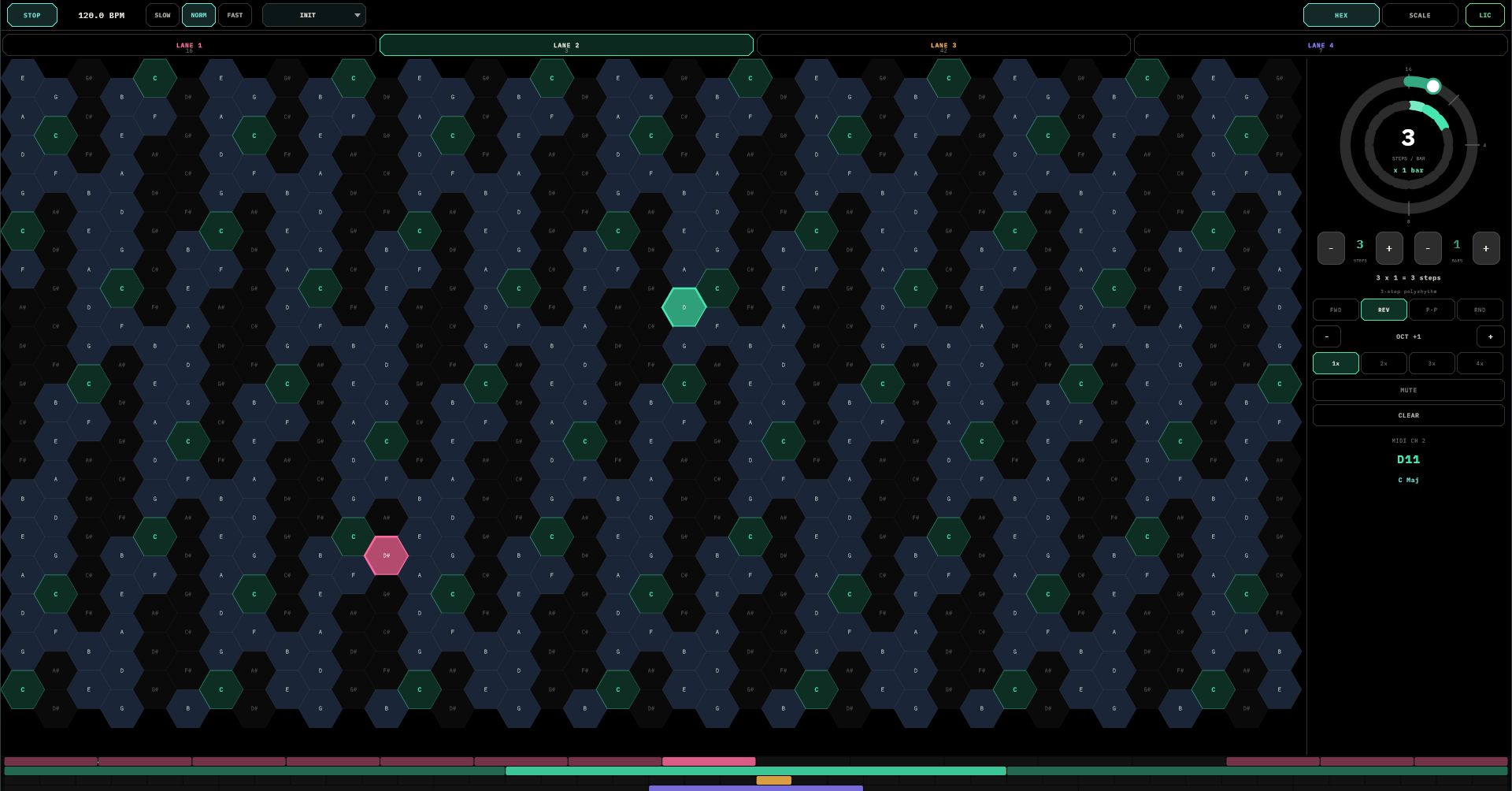
- HEX page — lane tabs (with live step counts), the honeycomb, per-lane step bars along the bottom, and the lane control panel on the right.
- SCALE page — circle of fifths, per-lane pitch meters, a live output-monitor keyboard, the segment timeline, and the TUNING chip.
The Hex Keyboard
Wicki-Hayden layout: one column right is a whole tone up, one row up is a fifth. The consequence is the whole point — every scale and every chord is the same shape in every key. A major scale is one zig-zag, everywhere. A triad is one three-finger claw, everywhere. Learn a shape once, own it in twelve keys.
Reading the grid: root hexes glow brightest, in-scale hexes are lit, out-of-scale hexes fade back (still playable — they'll be snapped into key anyway). When a lane plays a cell, the cell flashes in that lane's colour, so the keyboard doubles as a score.
Multitouch goes deep — up to ten fingers. The first records into the selected lane; each additional finger automatically takes the next free lane. Two hands, four lanes, one chord of melodies.
Lanes & Polyrhythm
Four lanes — Rose, Emerald, Amber, Violet — each with its own loop length, direction, octave, ratchet, mute, and MIDI channel (1–4). They run independently, and that is the instrument: lanes of different lengths slip against each other, and a pattern that took ten seconds to record takes twenty-one bars to repeat. Out of the box the lanes come up at 16, 12, 8, and 7 steps — already a polyrhythm before you've played a note.
Lane Controls
The right panel edits the selected lane:
- The loop dial — a radial two-ring control: inner ring is steps per bar (1–16), outer ring is bars (1–16), with magnets at the sensible stops and a readout doing the math (
3 × 1 = 3 steps). Prime numbers are right there and they are your friends. - Direction —
FWD · REV · P-P · RND. Reverse for mirror melodies, ping-pong for there-and-back phrases, random for in-key generative clouds. - Octave — ±4, without touching the recorded cells.
- Ratchet — 1× to 4× hits per step, each a little softer than the last. A tap becomes a roll.
- MUTE — silences the lane but its clock keeps running, so it comes back in phase.
- CLEAR — wipes the lane. There is no undo; save first, be brave second.
- Readouts — the lane's MIDI channel, the note it's playing right now, and the active key.
Scales, Keys & Other Worlds
Every note Fingerbang emits is snapped into the current scale at playback time — change the key and every recorded lane re-harmonises instantly, mid-loop. There are no wrong notes, only surprising ones.
The segment timeline on the SCALE page owns the key — always running, one segment or many. Each segment is a root + scale + bar count (16 scales, up to 16 segments); tap a segment's body to edit it, tap its individual keys to sculpt a custom scale (marked *), drag its edge to resize, + to add. One segment is a static key; four segments are a chord progression your lanes walk through without being asked.
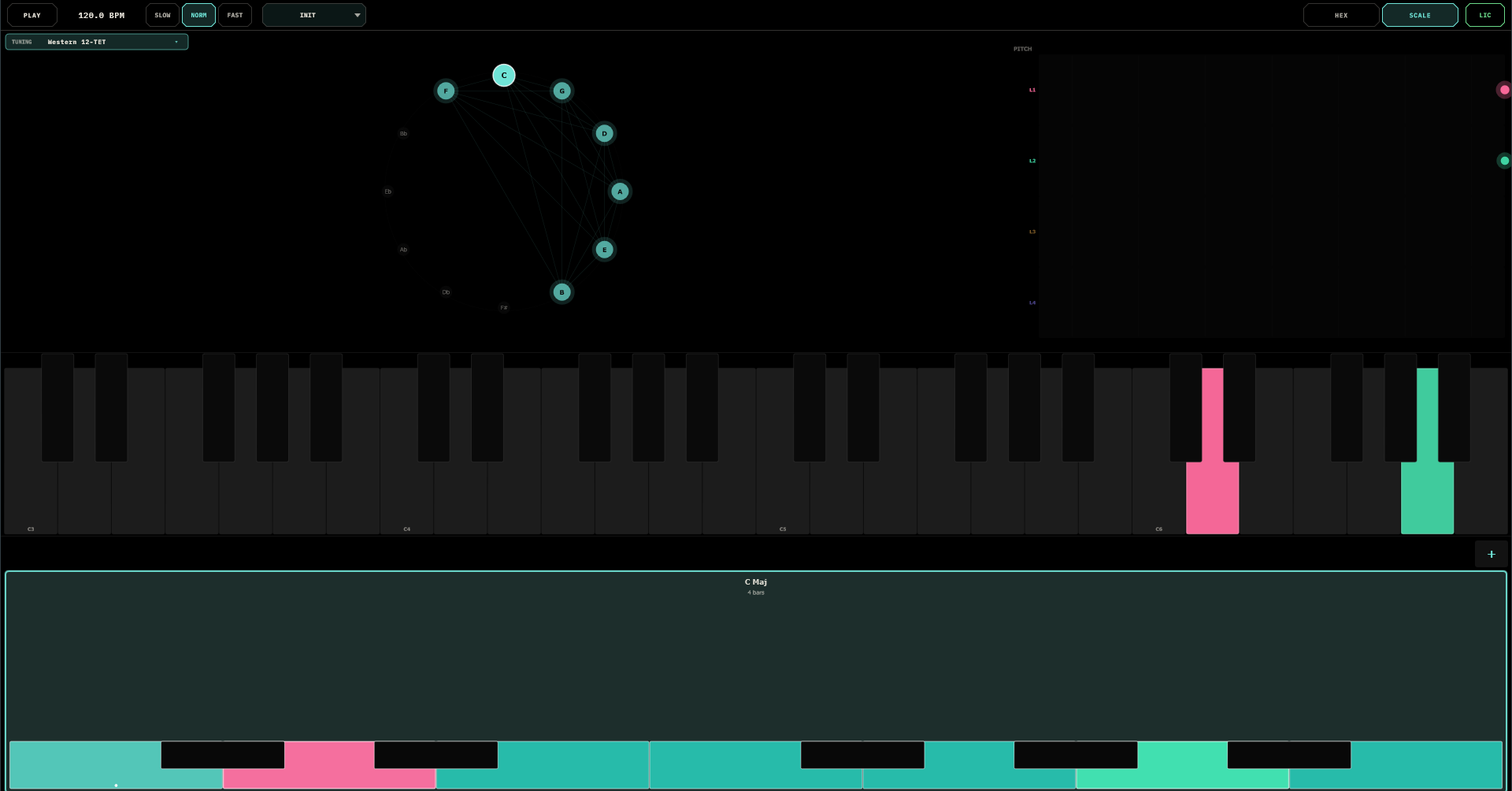
Other tuning worlds: the TUNING chip swaps the global intonation — eleven systems, from Western 12-TET through Just Intonation, 24-tone Arabic maqam, 53-comma Turkish makam, 22-shruti, Persian dastgah, and Chinese 12-lü. The circle of fifths becomes a tuning wheel with the system's true pitches, and MIDI out carries the intonation as per-lane pitch bend — point your synth at it and it follows.
If a host pushes a global key (the TouchMachines Liveset does this), the SCALE page goes read-only and shows FOLLOWING HOST until released. Your own progression waits underneath.
MIDI & Routing
Lanes 1–4 emit on channels 1–4. Two classic setups:
- One multitimbral synth listening on four channels — four patches, one instrument.
- Four instrument tracks, each filtering one channel — a lane per synth, the recommended layered setup: lead, counter-melody, bass, texture.
Transport and tempo follow the host; SLOW/FAST layer on top for instant half-time and double-time without touching your session. On stop, everything is released cleanly — no stuck notes, ever.
One honest note: Fingerbang doesn't listen to MIDI notes in — the hexes are the keyboard. Keys are a grid of twelve; this is a grid of geometry.
Gesture Control
Fingerbang listens for CC gestures on channel 1, so a wiimote — or anything CC-shaped — becomes a hand hovering over the honeycomb:
| CC | Gesture |
|---|---|
20 / 21 | Tilt — aim a cursor across a virtual hex grid |
22 | The finger — hold to record the aimed note, move to re-aim |
26–29 | D-pad — select lane 1 / 2 / 3 / 4 |
The aimed cell shows a lane-coloured ghost ring that thickens while you're recording. Conduct melodies from across the room; the audience sees the honeycomb light up where you point.
Presets
The preset chip opens a browser with folders — tap to load, + SAVE, + FOLDER, drag to re-file, rename and delete in place. One factory preset ships: Init, the clean four-lane slate. A preset captures everything — all four lanes, the scale timeline, the tuning system — and the full state also rides along with your DAW session automatically.
Fingerbang runs a 14-day free trial, fully functional; the pill in the top bar counts it down, and afterwards the demo pauses its MIDI for a few seconds each minute until licensed.
Recipes
1 · An evolving arpeggio from one gesture
Lane 1 at 16 steps: hold a finger and trace a slow upward diagonal while the playhead sweeps. Lane 2 at 12 steps, direction REV: a descending line. Lane 3 at 8 steps, ratchet 2×: tap four bass cells. Three lanes, three periods — the pattern breathes for 48 steps before it repeats itself.
2 · Live chord changes
Record two or three lanes in C Major. On the SCALE page, build C Maj · A Min · F Maj · G Maj, one bar each. The lanes re-harmonise through the progression automatically — a chord track you performed once and never have to touch again.
3 · The generative drone
One lane, direction RND, scale Pentatonic. Populate a wide spread of cells. It now emits an ambient in-key cloud forever. Add a second RND lane an octave down at a prime step count and leave the room with dignity.
4 · Contrary motion for free
Record an ascending arpeggio. Duplicate the gesture on another lane set to REV at OCT −1. Instant mirror counterpoint — the trick composers practise for years, available by pressing two buttons.
5 · The half-time drop
Pattern playing. Hit SLOW — everything halves, instantly majestic. Mute two lanes for the breakdown. On the cue: unmute, NORM. Drop delivered.
6 · Ten fingers
Select lane 1, put both hands down. Fingers fan across all four lanes at once — a four-part texture recorded in a single two-handed gesture. This is the party trick. Practise it before the party.
Field Notes
- No sound? Correct — Fingerbang is MIDI-only. Route it to a synth; check each lane's channel has a listener.
- Sequencer not moving? The transport isn't running. Hosted: press play in the DAW. Standalone: the PLAY chip.
- Out of key? Check the SCALE page — and remember Chromatic doesn't quantize, by definition.
- Key won't change by hand? A host is pushing the key (FOLLOWING HOST), or you're expecting pickers that live inside the segment popup — tap the segment.
- Fingers landing in the wrong lane? The first finger goes to the selected lane; select first, then touch. Extra fingers fan out by design.
- Prime step counts are the cheat code. 5, 7, 11, 13 against a 16 — patterns that outlive the set.
- RND + Pentatonic cannot fail. Literally cannot.
- No undo exists. CLEAR means it, save often, and let the occasional loss make you braver.