Glyph
An instrument you draw. Ink strokes onto a plane with your fingers; four playheads sweep the plane and read your drawing as music — pitch from where the ink sits, timing from when the light crosses it. The audience sees the beam hit the stroke at the exact moment they hear the note. Drawing is composing. The plane is the score. You are the pen.
Quick Start
- Load Glyph (standalone opens fullscreen; F11 toggles it).
- Press PLAY — the host transport in a DAW, the PLAY chip in standalone.
- Draw a stroke. The beams cross it; you hear a plucked note. That's the whole idea — everything else is elaboration.
- Add more fingers. Up to four draw at once, each landing in its own coloured lane. A four-voice sketch in one gesture.
- Open WARP — mirror it, spin it. Your drawing multiplies.
- Tap ARM, then tap a stroke — solid → dashed → ghost → solid. Individual strokes fade in and out of the arrangement without redrawing.
- Save — the preset chip,
+ SAVE, name it. Patterns are the bricks the SONG tab builds with.
The Machine
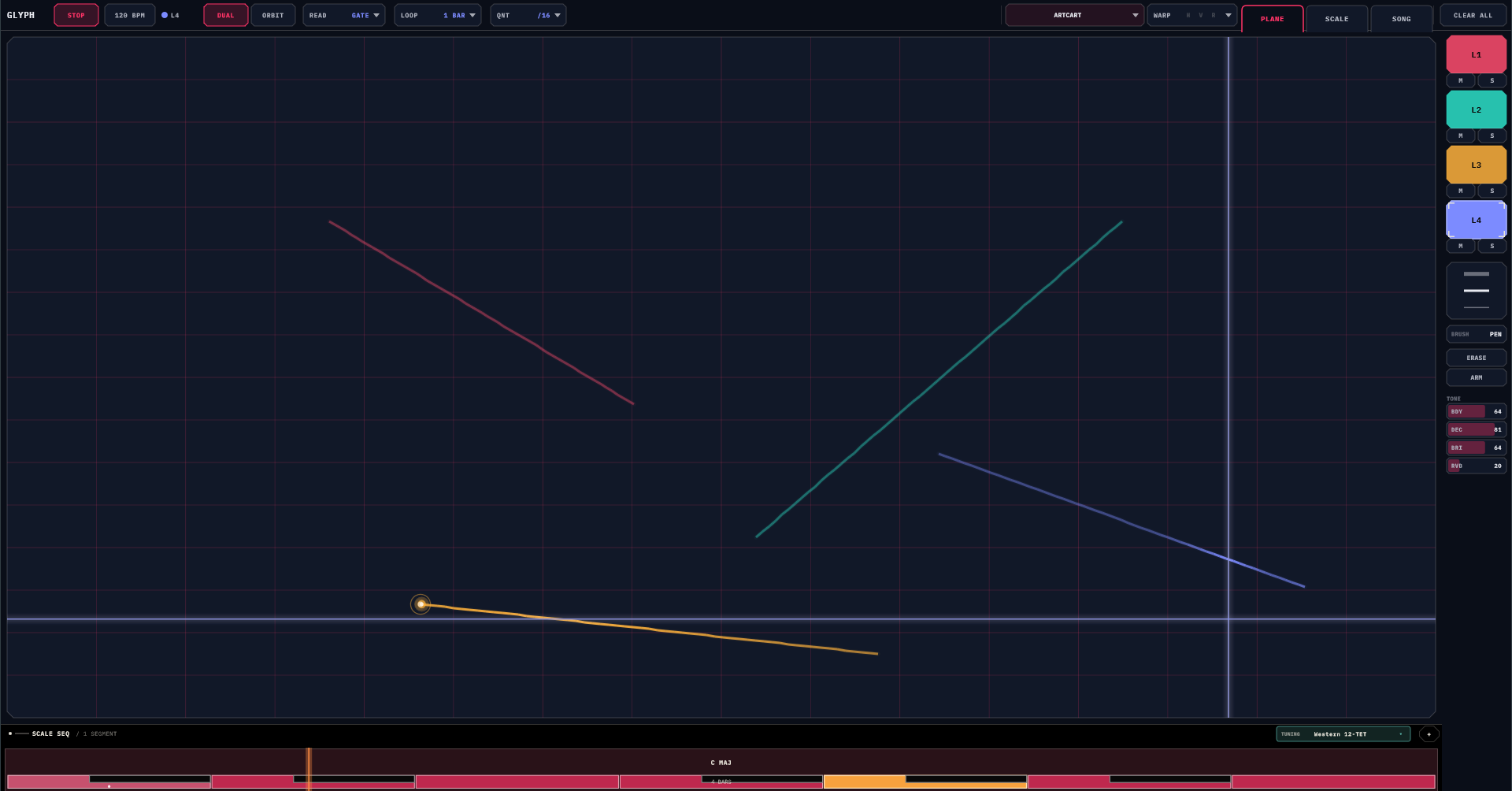
- Top bar
- PLAY/STOP and BPM (standalone; drag the BPM chip vertically), the lane badge showing which lane the chips act on, DUAL | ORBIT, READ ▾, LOOP ▾, QNT ▾ (all per-lane), the preset chip, WARP ▾ with its lit H·V·R badges, the PLANE | SCALE | SONG page tabs, the trial pill when unlicensed, and CLEAR ALL.
- The plane
- The drawing surface, with its hairline grid and (when quantize is on) brighter snap lines.
- Scale strip
- The always-on key timeline, docked under the plane with its TUNING chip.
- Side rail
- Four lane swatches with M/S, the pen-size selector, BRUSH, ERASE, ARM, and the four TONE bars (BDY · DEC · BRI · RVB).
- GLYPH
- (The wordmark) opens Settings, MIDI routing, licensing, and About.
Drawing
A stroke is one touch: down, drag, up. It captures where you drew, how thick the pen was, which brush, and how fast your hand moved. Taps without a drag are ignored — Glyph wants gestures, not dots.
- Multi-touch — the first finger draws into the selected lane; each extra finger takes the next free lane. Four fingers, four colours, one sweep of the hand. This is the signature move.
- Pinch to scale — two fingers (before either has really drawn) scale the selected lane's strokes around the pinch midpoint. Shrink a phrase to tighten it, blow it up to stretch it across the plane.
- Erase — double-tap any stroke for a one-shot delete, or toggle ERASE and sweep through ink like a tiny angry eraser.
- ARM states — with ARM lit, tapping a stroke cycles: Armed (plays, solid) → Ghost (plays ~40% of the time, dashed) → Muted (silent, faint) → Armed. Lane mute silences a colour; stroke states arrange within a colour. Build dense, then sculpt.
Where the ink sits is what it plays: the plane spans about two octaves, snapped to the current scale. High on the plane is high in pitch. There are no wrong notes, only surprising ones.
Brushes
A brush isn't a paint style — it changes what a crossing plays. Pick from the BRUSH popover (live previews + a SIZE strip); it's captured per stroke, so one lane can mix all five.
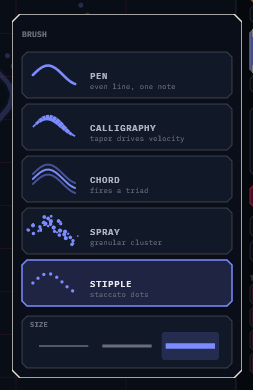
| Brush | Looks like | A crossing plays |
|---|---|---|
| Pen | even line | one note, clean and predictable |
| Calligraphy | speed-tapered ribbon | one note whose velocity follows the local width — draw fast for thin and quiet, slow for wide and loud; one swoop plays a crescendo |
| Chord | a three-line band | a triad, built from the scale, so it always lands |
| Spray | a scattered dot cloud | a soft granular cluster across nearby scale tones |
| Stipple | evenly spaced dots | a crisp staccato note — dotted lines become plucky runs |
Pen size (Fine / Med / Fat, on the rail or in the popover) sets the base weight for everything: louder and longer as you go fatter, and it scales Calligraphy's taper, Spray's cloud, Stipple's spacing.
Reading — MODE × READ
Each lane answers two questions independently: where does the read head move (MODE) and what does it do with the ink (READ).
MODE — the geometry
- DUAL — two beams: one sweeps left→right (pitch from the ink's height), one sweeps top→bottom (pitch from its horizontal position). Every stroke fires from both axes per pass, at two different pitches. Piano-roll feel, double counterpoint free of charge.
- ORBIT — a ray rotating from the centre like a radar. Where you started the stroke is when it fires in the rotation; how far from centre is its pitch. Clock-face composing.
READ — the policy
- GATE — discrete plucks at each crossing, snapped to QNT. The default.
- TRACE — the lane becomes a continuous glide bow: one sustained voice locks onto the contour and slides along the ink. QNT off is true portamento; QNT on steps the slide to scale tones. A diagonal is a scale run; a circle is a rising-falling voice.
- WALK — the head leaves the sweep entirely and travels the ink itself. Your strokes chain in draw order, each getting a share of the loop proportional to its length; the bead of light on the line is the playhead. A spiral is a rising-falling run, a zigzag an interval pattern, a short tick a stab. Muted strokes are walked as rests — silence with its timing intact. Draw order is composition.
Warps
The WARP popover holds three non-destructive transforms — your original strokes are never touched; the warps conjure virtual copies:
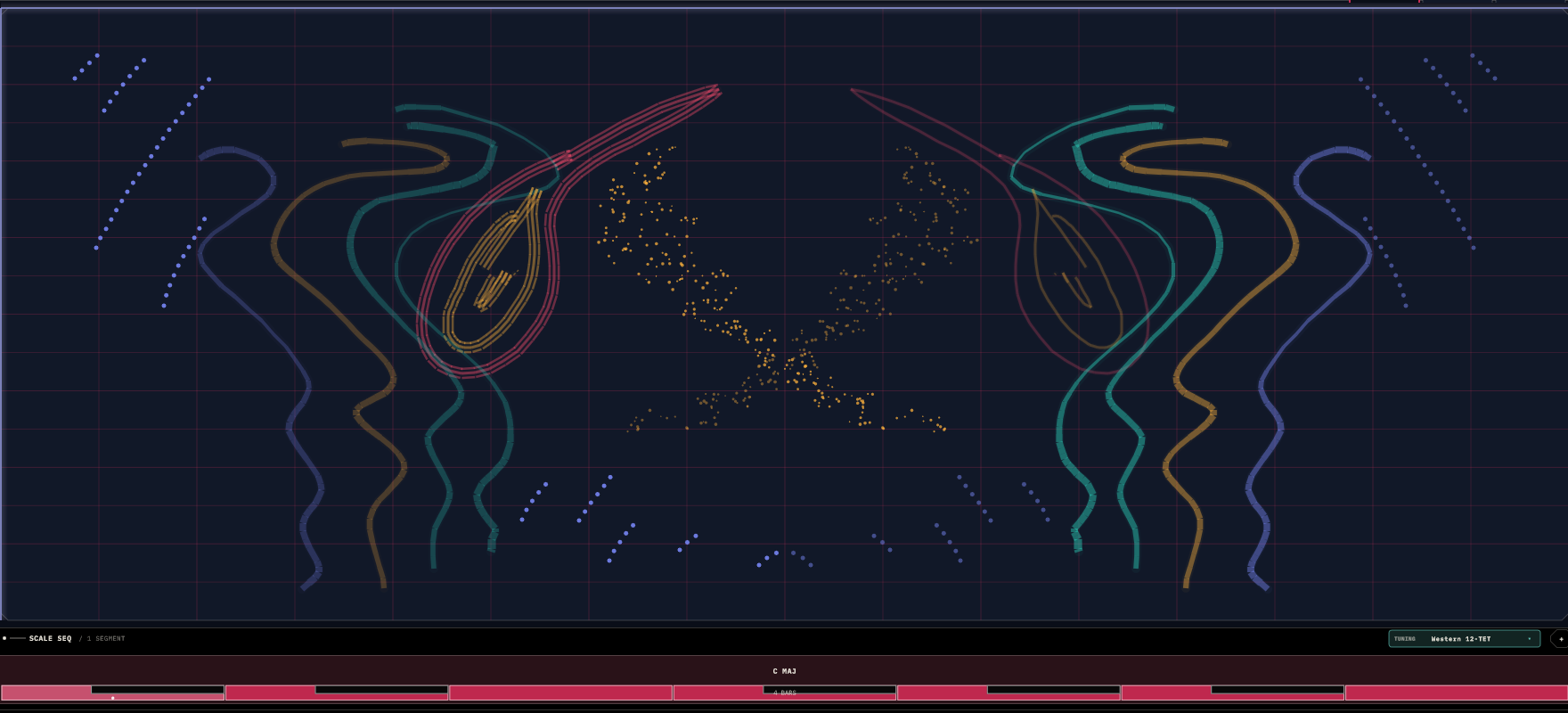
- MIR-H / MIR-V — mirror the plane across its centre. The copies render faint, play for real, and under WALK they join the walk — flip a mirror on and hear the reflected phrases enter the loop.
- ROTATION — the whole plane spins: OFF to one full revolution per bar, clockwise or counter. At 1/16 it's a slow drift you notice minutes later; at 1× it's dramatic. Drawing while it spins works exactly as you'd expect — the ink lands under your finger and rides the wheel.
Lanes & Polyrhythm
Four lanes, each with its own strokes, MODE, READ, quantize, mute/solo, MIDI channel — and its own LOOP length, set as steps × bars on a radial dial. The playhead makes one full pass per loop, so different lengths per lane make the four beams drift apart and interlock: 1 bar against 2 against 3 against 0.75 is a machine that never quite repeats.
QNT (per lane: OFF · /16 · /8 · /4, default /16) snaps each stroke's firing moment to the grid — sloppy drawing, punctual music. Turn it OFF when you want the raw geometry to phrase for itself.
Scales, Keys & Other Worlds
The scale strip under the plane owns the key — an always-running chain of segments, each a root + scale + bar count. One segment is a static key; several are a progression that every lane re-harmonises through, mid-flight. Tap a segment to edit (root, scale, bars, or tap keys to sculpt a custom scale); drag an edge to resize; + adds one (new segments politely inherit their neighbour's length). The SCALE page is the full-screen version, with a circle of fifths, per-lane activity dots, and a live output monitor. 17 scales ship, Chromatic through both Diminisheds plus Arpeggio.
Other tuning worlds: the TUNING chip switches the global intonation — eleven systems, from Western 12-TET through Just Intonation, 24-tone Arabic maqam, 53-comma Turkish makam, 22-shruti, Persian dastgah, and Chinese 12-lü. The circle of fifths becomes a tuning wheel, and every fire — internal pluck and MIDI out alike — lands on the system's true pitches (MIDI carries them as per-lane pitch bend).
If a host pushes a global key (the TouchMachines Liveset does this), both scale surfaces go read-only and show FOLLOWING HOST until released; your own progression is kept safe underneath.
Sound
Glyph's internal voice is a plucked string resonating through the body of a real recorded guitar, with a reverb behind it. You always hear it — the drawing is never silent — and MIDI out runs alongside for driving other instruments.
Four TONE bars on the rail:
- BDY
- How much guitar-body wood is in the sound: 0 is a naked string, 99 is all resonance.
- DEC
- Pluck decay: staccato at the bottom, long singing rings at the top.
- BRI
- Dark and warm to sharp and glassy.
- RVB
- The room, from none to plenty.
All four save with the patch — a "warm and long" pattern and a "tight and bright" one keep their own sound.
SONG
Chains your saved patterns into a looping arrangement. The library shows every pattern as a thumbnail of its actual strokes — you recognise your material by shape, which is exactly how it should work in a drawing instrument. Tap a pattern to append a bar; tap again to extend; tap a timeline step to cycle its length; hold it to remove it.
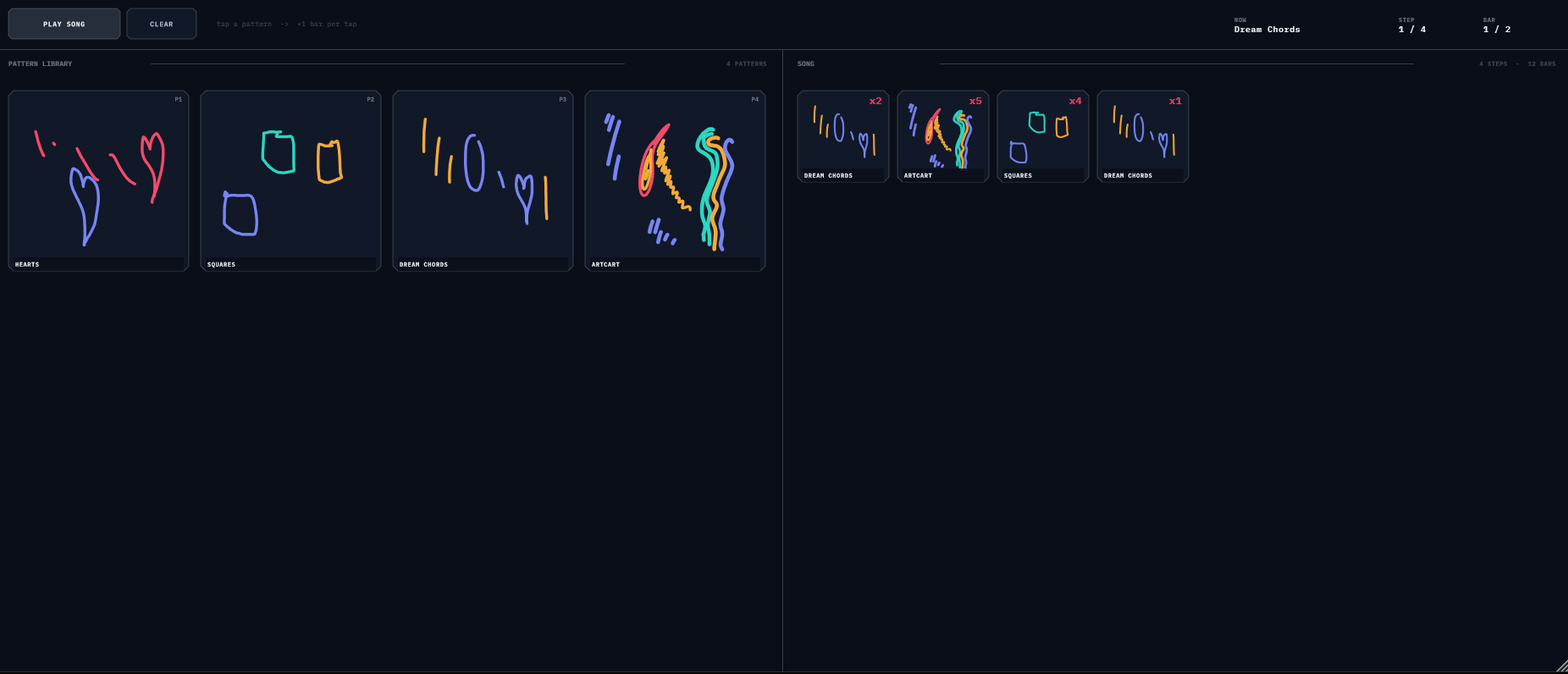
PLAY SONG arms on the next bar line and then swaps the whole patch — strokes, warps, key, tone — at every step boundary, cleanly (stuck notes are flushed on every swap). The song lives with your DAW session, not inside any preset, so saving a pattern never drags the arrangement with it. Patterns are referenced by name: renames follow automatically, deletions show (MISSING) and get skipped politely.
MIDI Out & CC
Per lane in Settings → MIDI: enable, channel (defaults 1–4, ready to route the moment you load it), octave, or Route All onto one shared channel. Notes go out scale-snapped, exactly matching the internal voice.
CC out is where drawing becomes modulation: each lane has two independent CC streams, each with its own controller number and source — Contact X / Contact Y (where the playhead last touched your ink) or Sweep Pos (the loop position itself, a free ramp per lane). Draw a rising curve, send its Contact Y to a filter cutoff, and one gesture plays the notes and opens the filter. The streams only send when the value changes, so they're polite on the wire.
MIDI in auditions the internal pluck — play the engine from a keyboard to hear the current tone without drawing.
Presets & Settings
The preset chip opens a browser with folders — tap to load, + SAVE, + FOLDER, drag to re-file, rename and delete in place. Glyph ships with an empty library — the chip reads (NONE) until you've drawn something worth keeping, which will take you about a minute. A preset (a pattern, in SONG terms) captures strokes, lane settings, warps, tone, and the scale timeline. MIDI routing, themes, and the song itself deliberately stay outside — that's rig setup, not pattern identity.
Settings (tap GLYPH): five surface themes (Dark, Midnight, High Contrast, Void, Warm), lane colour palettes — including three tuned for drawing pictures on black, with hues spread wide so four-colour sketches stay legible — individual lane colour overrides, and UI scale. Glyph runs a 30-day free trial, fully functional; the top-bar pill counts it down, and afterwards the demo goes briefly quiet each minute until licensed.
Recipes
1 · The four-finger opening
Press play. Put four fingers down and draw four short strokes in one motion. Then give each lane a different LOOP length — 1, 2, 3, 4 bars. Open WARP, MIR-H on, rotation 1/4. You have a generative quartet and it took eleven seconds.
2 · Shapes into melodies
Lane 1: draw a clean upward diagonal, READ = TRACE, QNT /16. That's a scale run. Lane 2: draw a circle, MODE = ORBIT, READ = TRACE, LOOP 2 bars. That's a contrary-motion arpeggio. Switch the scale to Pentatonic and both become instantly presentable.
3 · Live arrangement with ARM
Build a dense plane — too dense. Tap ARM and thin it live: a tap ghosts a stroke (sometimes), another mutes it (rest), another brings it back. The drawing is the mixing desk.
4 · The kaleidoscope pad
One long lazy curve. MIR-H + MIR-V on. Rotation 1/4, CCW. READ = TRACE, scale Pentatonic, DEC and RVB up. An endless evolving pad from a single drawn line — the drawing does the composing, you take the credit.
5 · Draw the modulation
Lane 1 plays a bass figure to a synth on channel 1. Enable CC out 1 = Contact Y → CC 74, and map that to the synth's filter. Now redraw the same phrase higher or lower on the plane and the timbre moves with the melody. The plane is now both score and mod matrix.
6 · Patterns, then a song
Save four patterns with recognisable shapes — you'll be choosing them by thumbnail. SONG tab: tap them into a form (x4 · x8 · x4 · x2), start the transport, PLAY SONG. It waits for the bar line, then plays your set while you stand there looking like you planned everything.
Field Notes
- Pentatonic + quantize = no wrong notes, no wrong time. Aggressive snapping is a feature; sloppy hands, tidy music.
- Multi-touch is the party trick. Learn to drop four fingers at once.
- No sound? The internal voice is always on — check your audio device. External synth silent? Settings → MIDI, check the lane's enable and channel.
- TRACE sounds like one long slide? That's QNT OFF doing portamento, as designed. Set /16 to step it. (WALK never slides — it's a step reader.)
- ORBIT firing in the "wrong" place? The trigger is where you started the stroke. Start where you want the hit.
- A stroke barely plays and looks dashed? It's ghosted. ARM tool, tap it to mute or re-arm.
- Pinch keeps drawing instead? Pinch only engages before the first finger has really moved. Place both fingers, then pinch.
- Chip says
(NONE)? You haven't saved a pattern yet. Draw something. Save it. Name it something you'll recognise as a shape. - Song won't start? The transport isn't running — PLAY SONG waits for bar lines, and no transport means no bars, ever.
- Edits not showing in the song? Songs load patterns by name — re-save the pattern after editing so the next pass picks it up.
- CLEAR ALL clears the patch, not the song. Save first anyway.