Gravity
Four orbs, a gravity well, and walls that ring like bells. Fling an orb and it falls, ricochets, and plays notes — where it hits a wall decides what it plays; the physics decide when. You don't write the music. You build a tiny solar system and curate what it sings.
Quick Start
Zero to orbit in under a minute:
- Load Gravity on an instrument track (or launch the standalone — it opens full-screen, as nature intended).
- Pick a preset.
Slow Orbitsis a gentle first world. - Press PLAY — or run your DAW's transport; the host always wins.
- Fling an orb. Grab it, drag, let go. The throw becomes its velocity.
- Drag the gravity well — the circle near the middle. Move it and every orbit in the room bends.
- Set
Pulseto 2 bars on the top bar. Now the well inhales in time, and chaos starts keeping a schedule.
The Machine
- Top bar
- Play/Stop, tempo (60–240, follows your host), the INSTRUMENT | SCALE view switch, World (the global tuning system), Pulse, Presets, Hide Panels, Settings.
- Left rail
- Orb enables, Octave (−2…+2), Key Range, Quantize, Orb Collisions, Plane Shape, and a Reset Orbs button at the bottom for when the experiment escapes.
- The plane
- The arena. Everything alive lives here.
- Right panel
- Four tabs: PHYSICS · SOUND · VISUALS · MIDI.
- Scale strip
- The key-change timeline, always running along the bottom. Tap SCALE up top for the full-screen editor.
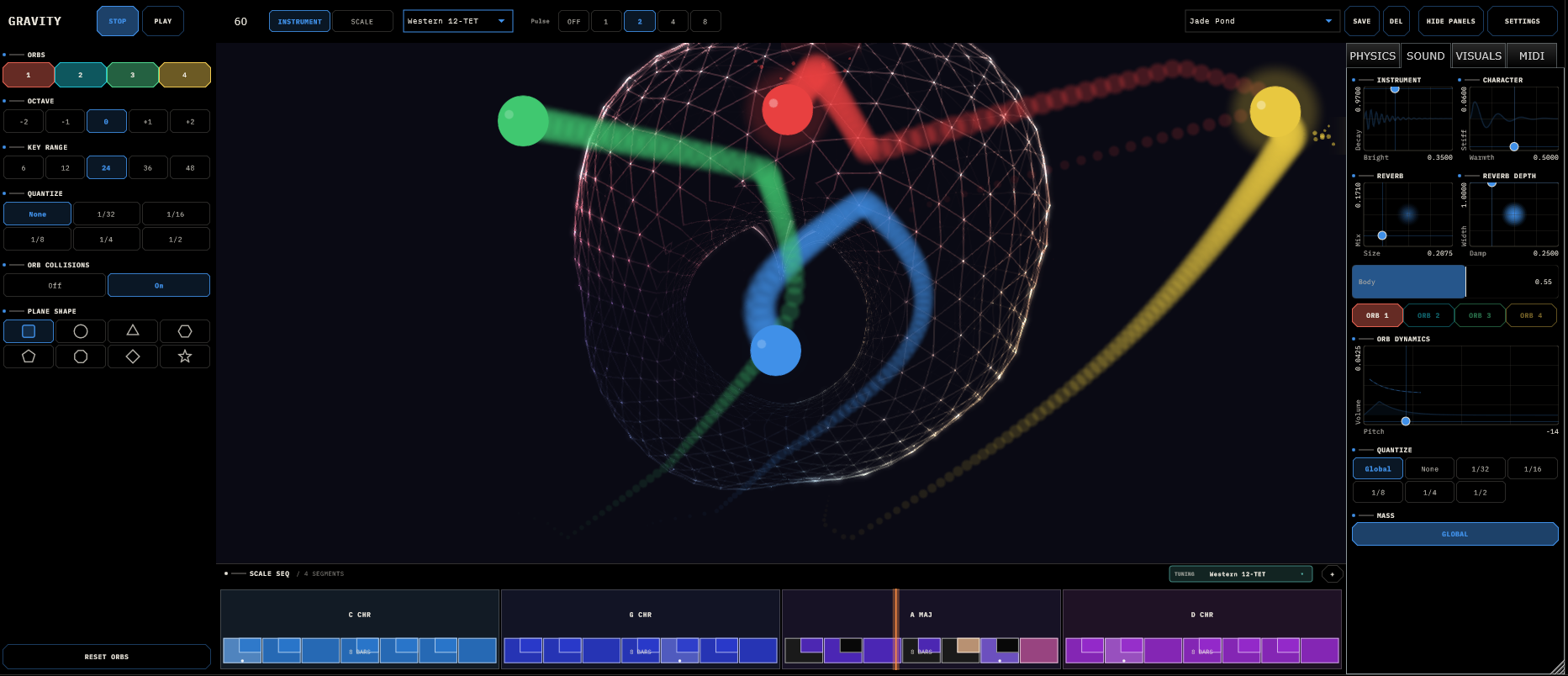
Hide Panels collapses everything but the plane — the correct mode for touch screens and stages. F11 (or Ctrl+Cmd+F) goes fullscreen in standalone.
The Plane
Grab an orb and it follows your finger; release and it flies. Grab the gravity well and drag it anywhere — stronger well, tighter orbits.
When an orb strikes a wall, the wall flashes in that orb's colour and plays a note. Where it hits is what it plays: each impact point along the boundary maps to a note of the current scale, low at one end, high at the other. Middle of a wall, middle of the scale. Corners get dramatic.

Eight worlds to bounce in
The boundary doesn't have to be a box. The Plane Shape selector offers Rectangle · Circle · Triangle · Hexagon · Pentagon · Octagon · Diamond · Star, and each one plays differently:
- Rectangle — the classic. Each of the four walls spans the whole scale on its own.
- Every other shape — pitch walks once around the entire perimeter, clockwise from the top. A circle sweeps pitch like a clock face; a star winds in and out through the spikes.
- Sharp corners (triangle, diamond, star) ricochet hard and play jagged. Round-ish shapes (circle, octagon) glide and play smooth.
Switch shapes mid-performance — orbs get scooped back inside automatically, and the shape saves with the preset.
Orb Collisions
Toggle on the left rail. When on, orbs colliding with each other also play — a note split between the two orbs' last wall notes, snapped to scale. Cheap harmony, occasionally profound.
Physics
The PHYSICS tab. This is where the feel of the universe lives.
| Control | What it does to the music |
|---|---|
| Gravity (0–1) | How hard everything falls. Low = zero-G drifting. High = orbs slam the floor and chatter. |
| Damping (0–1) | Energy lost per bounce. Low = perpetual motion. High = quick settling. |
| Central Mass — Strength × Size | The well's pull and reach. Zero strength = free space; full = a black hole with a volume knob. |
| Friction (0–1) | Surface drag. Low and orbs slide forever; high and they park. |
| Orb Mass (0.1–5) | Heavier orbs fall harder and argue less with the well. Global, with a per-orb Custom override on the SOUND tab. |
| Orb Size ×4 (0.015–0.16) | Bigger orbs hit walls sooner and get grabbed easier on stage. |
Pulse (top bar: Off / 1 / 2 / 4 / 8 bars) makes the well surge on a bar-locked schedule. It is the closest thing Gravity has to a metronome — if a patch feels arrhythmic, turn it on before touching anything else.
Sound
The SOUND tab. One shared plucked-string voice plays all four orbs polyphonically — four hands, one instrument.
The instrument (global)
- Brightness
- Dark and woody → bright and glassy.
- Decay
- Short pluck → piano-length ring-out.
- Warmth
- Metallic and nasal → dark and mellow.
- Stiffness
- Zero is an ideal string; raise it and the overtones bend upward into piano-like inharmonicity.
- Body
- How much wooden-box resonance sits under the string.
The reverb (global)
- Size × Mix
- Closet → cathedral, dry → drowned.
- Damp × Width
- Bright glassy tails vs dark plates; mono → full stereo.
Per orb
Pick an orb with the selector, then:
- Pitch / Volume
- Pitch (±24 semitones) and Volume — one XY pad.
- Quantize
Global · None · 1/32 … 1/2. A collision either sounds instantly (None) or waits for the next grid line. Mix per-orb values for instant polyrhythm — one orb on1/4, one on1/16, one feral.- Mass
- Global/Custom toggle, for one deliberately heavy planet.
Scales, Keys & Other Worlds
Everything Gravity plays is snapped to scale. There are no wrong notes, only surprising ones.
The scale timeline
The strip along the bottom is a chain of segments — each one a root + scale + bar count (1–16 bars, up to 16 segments). The playhead sweeps; when it enters a new segment, the whole instrument re-harmonises, locked to the transport. One segment = a static key. Four segments = a chord progression your orbs play through without being told.
- Tap a segment to edit root / scale / bars; ADD and DEL in the header; drag an edge to resize.
- Tap individual keys on a segment's keyboard to sculpt a custom scale, note by note. A
*marks your mutations (C Maj*). Tap any preset root/scale to revert. - The SCALE view (top bar) is the same thing full-screen, with a circle of fifths, orb-coloured activity dots, and a live output monitor showing what's actually sounding.
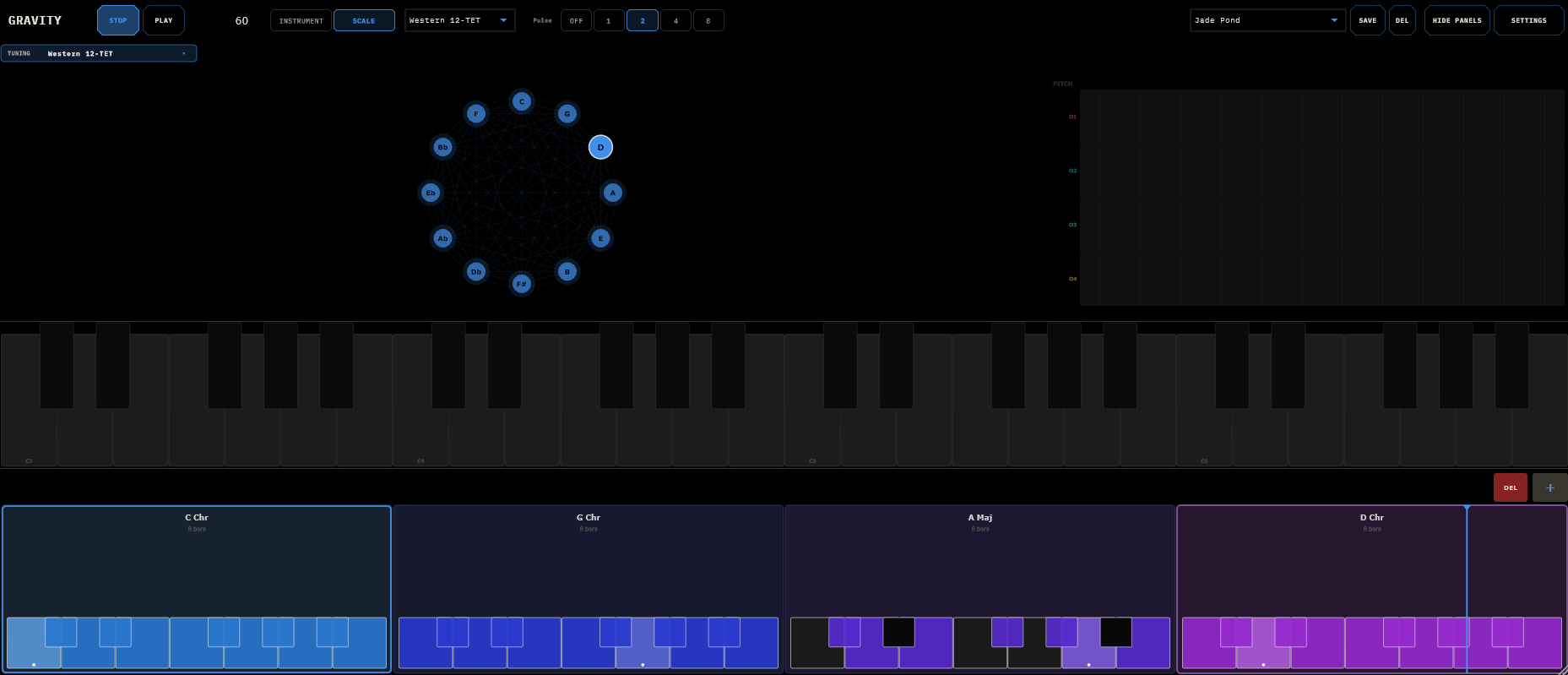
16 scales ship, from Major to Whole Tone to both Diminisheds, plus Key Range (left rail: 6–48 semitones) controlling how much of the scale a wall spans — small range hugs the tonic, big range leaps.
Other tuning worlds
The World selector (top bar) sets the global intonation — not which notes, but where the notes actually are. Eleven systems: Western 12-TET, Pythagorean, Just Intonation, Arabic 12-tone and 24-tone maqam, Turkish 53-comma makam, Indian raga and 22-shruti, Persian dastgah, Chinese pentatonic and 12-lü. Pick a non-Western world and the SCALE view becomes a tuning wheel with the system's pitches at their true positions; the internal voice plays them exactly, and MIDI out carries them as per-channel pitch bend so your external synths follow.
If your DAW or the TouchMachines Liveset pushes a global key, Gravity obeys and shows FOLLOWING HOST KEY — the scale surfaces go read-only until the host lets go.
MIDI Out
Every orb is also a MIDI instrument. Per orb, on the MIDI tab:
- Channel / Notes
- Channel (1–16; defaults 1/2/3/4) and Notes On/Off — each orb can drive its own synth, or all four can gang up on one piano.
- CC Out
- The orb's X and Y position stream as two CCs (defaults 16/17). An orb drifting in low gravity is the most organic modulation source you own.
- SOLO (per CC axis)
- Mutes every other CC Gravity sends so you can MIDI-learn one axis cleanly: solo, wiggle, map, next. Notes are never affected, and solo isn't saved — it's a mapping tool, not a performance state.
Routing ideas: four channels → one poly synth (the four-handed pianist), four channels → four synths (a physics-driven ensemble), or notes off + CC on (the orb becomes a slow expression pedal).
Gesture Control
Gravity listens for MIDI CC gestures, so a wiimote — or anything that can send CC — can play it from across the room:
| CC | Gesture |
|---|---|
26–29 | Select orb 1–4 (its halo flashes) |
22 | Grab / fling the selected orb |
24 / 25 | Flick impulse, X / Y |
23 | Free-control toggle — the orb follows tilt (CC 20 / 21) while staying a live physics object |
30 | Fire a gravity pulse by hand |
Touch always overrides gesture — the screen wins arguments.
Presets, Themes & Settings
Presets (top bar) opens a browser with folders: tap to load, + SAVE, drag to reorganise, rename/delete on the selected row. A preset captures the whole world — parameters, progression, theme, and the exact positions and velocities of the orbs and well.
Six factory worlds: Init (blank lab), Slow Orbits (perpetual smooth motion), Jade Pond (heavy, sticky, pentatonic), Pendulum Bells (bright and bouncy), Deep Well (dark inward spiral), Scatter (roaming and collision-happy).
Settings holds eight colour themes (all colour-vision-safe — the four orb colours stay tellable-apart in every one), full custom colours, and licensing. Gravity runs a 30-day free trial, fully functional; the pill on the top bar counts it down, and after that the demo politely goes quiet at intervals until you feed it a license.
The VISUALS tab controls the eye candy: motion trails (length × opacity), collision particles, and the glowing sphere's bloom and intensity. All cosmetic, all worth it — and the first things to turn down if CPU complains.
Recipes
1 · Hypnotic orbital ostinato
Load Slow Orbits. Gravity down to ~0.2, well strength up to ~0.6, drag the well slightly off-centre so orbits go elliptical. Pulse = 4 bars. Key Range = 24 for wider leaps. Leave the room; it will be fine without you.
2 · Rhythm machine
Start from Pendulum Bells. Gravity ~0.8, damping ~0.7 — fast bounces, quick settling. Global Quantize = 1/16, then set one orb to 1/4: that's your kick, holding the floor while the others chatter. Orb Collisions on for surprise accents.
3 · Four synths, one solar system
Four instrument tracks in your DAW, listening on channels 1–4. Notes On for all orbs. Mute Gravity's own audio if you want. One physics engine now conducts an ensemble.
4 · The orb as a modulator
One orb: Notes Off, CC On, CC X = 1, CC Y = 74. Gravity down to ~0.05. Throw it gently and let it drift — your filter now moves like weather.
5 · Chord changes without touching anything
Get any preset moving. On the scale strip: C Maj · 1 bar, A Min · 1 bar, F Maj · 1 bar, G Maj · 1 bar. The orbs keep doing what they do; the harmony travels underneath them.
Field Notes
- Start from a preset, not Init. The parameter space is a wilderness; presets are the marked trails.
- Low gravity + low damping = evolution. High + high = rhythm. Everything else is in between.
- Nothing playing? Check orb enables, per-orb volume, and that a transport is actually running. Expecting external MIDI? Notes On.
- Physics gone strange?
Reset Orbs, bottom of the left rail. No shame in it. - Orbits spiralling into a doom-pile at the centre? Lower the well strength. It's always the well.
- Collisions feel sloppy? Raise Quantize, or raise Damping so orbs settle instead of micro-bouncing.
- CPU hot? Particles off, Glow down. The universe is expensive.
- Orb-orb collisions silent? The toggle is off — or both orbs haven't hit a wall yet, and there's nothing to harmonise.