HarleyQuinn-Pitcher
A voice processor with five pads where the knobs should be. Autotune, channel vocoder, and character saturation in one chain, driven macro-first: a hero PITCH pad, a semitone ladder, and four XY pads named BITE, AIR, VOICE, and THROW that each own a fistful of deep parameters so your hands stay on the performance. And one more thing — flip a switch, type a sentence, and the vocoder sings that instead of you. Yes, really. No, it doesn't need the internet.
Quick Start
- Insert HarleyQuinn-Pitcher on a vocal track. It's an effect, not an instrument — it wants your voice at its input.
- Set KEY and SCALE in the header. The little piano shows you what's legal; the readout below it (
D#4 → E4) shows what you sang versus what you're getting. - Drag the PITCH pad — right for more correction, up for faster snap. Top-right corner is full robot; lower-left is "gently helped."
- Push the VOICE pad right and the tuner becomes a vocoder. BITE adds grit, AIR adds width and shimmer, THROW hurls the whole thing into stutters and freezes — and springs back when you let go.
- Bored of your own voice? Tap
MOD • AUDIO INat the bottom, type a sentence, hit GENERATE. Now the plugin sings your words. Welcome to the deep end.
The Machine
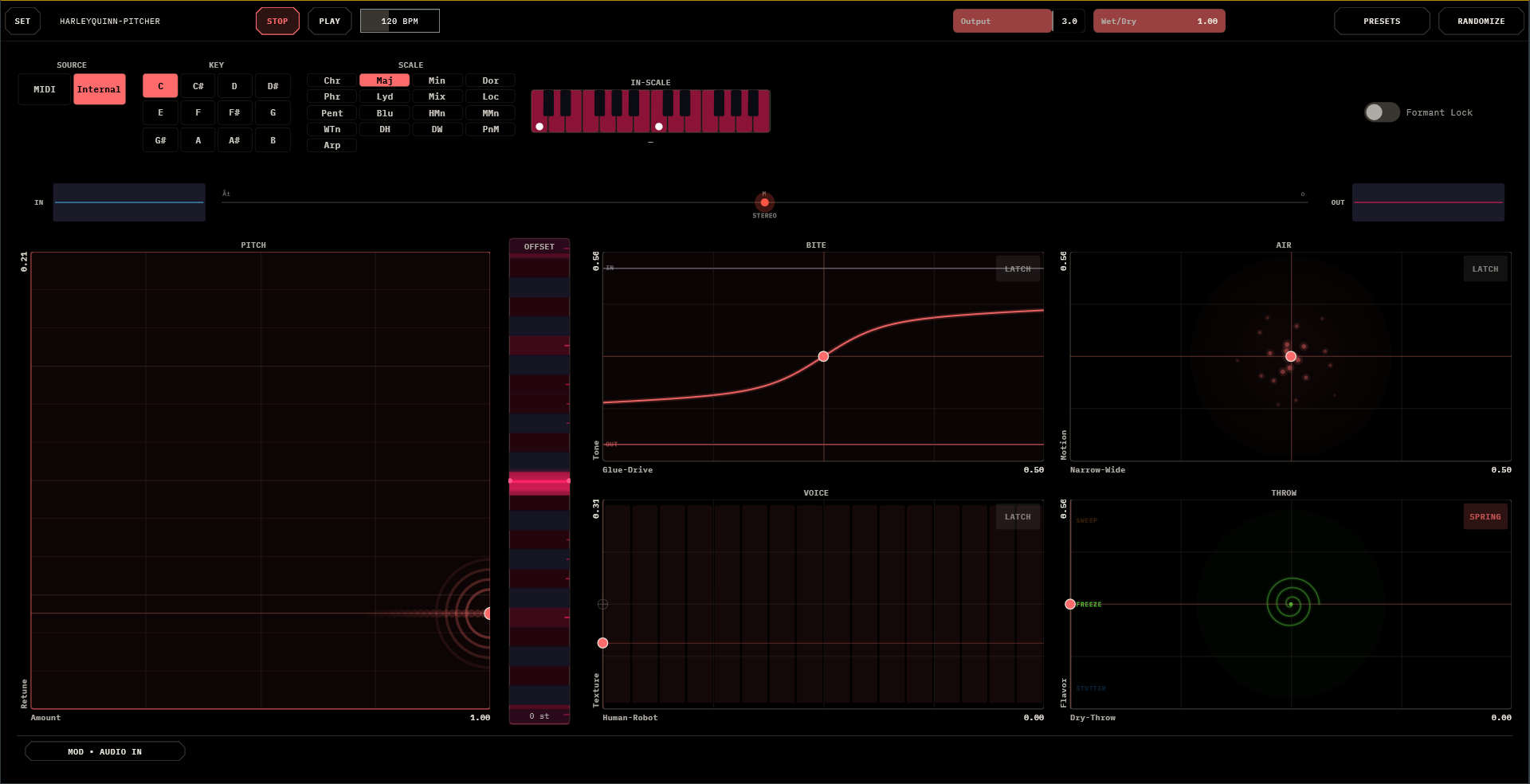
One window, no tabs, everything visible:
- Top bar — the SET gear (settings, themes, licensing), the standalone transport (STOP/PLAY/BPM — standalone only), Output and Wet/Dry strips, the trial pill, PRESETS, and RANDOMIZE.
- Header — SOURCE (MIDI | Internal), KEY and SCALE grids, the read-only IN-SCALE piano with root dots and the live snap readout, and Formant Lock — keep it on to pitch without chipmunking, off when chipmunking is the point.
- Mission strip — IN and OUT scopes flanking a stereo-correlation dot that goes green, amber, or red as your stereo health changes.
- The pads — PITCH (hero, left), the OFFSET semitone ladder beside it (±12, tinted to your scale, double-click to zero), and the 2×2 macro grid: BITE · AIR over VOICE · THROW.
- The bottom strip —
MOD • AUDIO IN, which is quietly hiding the entire TTS feature.
The whole canvas breathes: a faint spectrogram of the last few seconds drifts behind everything, each pad draws what it's actually doing to the signal, and the window scales uniformly from a Liveset grid tile to a full 8K wall. F11 for fullscreen in standalone.
The PITCH Pad
The hero. X is Amount — how far off-pitch material gets pulled toward the scale. Y is Retune — how fast: the bottom is a leisurely half-second glide, the top is instant hard-tune. The pad shows its work — correction halos ripple with the amount, a green pitch-trail scrolls your detected melody, and the retune trail shortens as you speed up.
- Amount right + Retune high = the modern hard-tune everyone means when they say "autotune."
- Amount right + Retune low = invisible correction that just makes you a better singer.
- OFFSET transposes the target — draw harmonies at +3 or +7, drop an octave for instant menace. Cells are tinted to the current scale so you can see where you're throwing the voice.
- Formant Lock keeps your vocal tract out of the transposition, so an octave down sounds like a bigger you, not a slower tape.
SOURCE — Internal vs MIDI
The most important switch in the plugin, and the most misunderstood:
- Internal — the plugin listens to your pitch, snaps it into the key, and drives its own carrier from what you sang. Nothing to play, nothing to route: sing and it works.
- MIDI — the carrier becomes a four-voice synth you play from the track's MIDI. Hold a chord and the vocoder speaks your voice through it — the classic. Held notes light up on the IN-SCALE piano so you can see the harmony you're wearing.
The Four Macros
Each pad drives a whole family of processors at once. For BITE and AIR the center is neutral — park the dot in the middle and the pad does nothing. VOICE and THROW rest at the left edge instead — slide right to enter.
- BITE — the aggression pad. X runs Glue → Drive: compression and polish on the left half, saturation and snarl on the right. Y is Tone, dark to present. The pad draws its live transfer curve, so you can watch yourself bending the signal.
- AIR — the space pad. X runs Narrow → Wide (from mono-tight to doubled and huge), Y adds Motion — shimmer and drift. The particle cloud disperses as you widen. This is where a dry vocal becomes a record.
- VOICE — the identity pad. X is Human → Robot: from pure tuned voice, through blends, to full vocoder. Y is Texture — the character of the robot, breathy to metallic. The band display shows the vocoder's channels lighting up under your voice.
- THROW — the stunt pad. X is Dry → Throw, hurling the vocal into buffer mangling; Y picks the Flavor — stutter at the bottom, freeze in the middle, sweep at the top. It ships in SPRING mode, so the moment you release, everything snaps back to dry. Throw hard, land clean.
Touch Physics — LATCH · SPRING · FREE
The little badge in each macro pad's corner is a physics selector — tap it to cycle:
- LATCH — the dot stays where you put it. A normal control.
- SPRING — release and the dot eases home. Perfect for stabs and throws; this is THROW's factory setting.
- FREE — release and the dot coasts with your flick's momentum, slowly braking. Flick a pad and let the sound ride out the physics.
Near an axis's home the pad has a gentle detente — close counts as exactly neutral, so "putting it back" never leaves residue. The physics modes are performance state: they reset each session and aren't stored in presets.
Keys & Scales
Seventeen scales from Chromatic through the modes, pentatonics, blues, both diminisheds, and Arpeggio — pick a root, pick a scale, and every correction, every carrier note, and the OFFSET ladder all agree about what's legal. The IN-SCALE piano is the always-on answer to "what key am I in," and the snap readout below it is the always-on answer to "is it working."
Chromatic deserves a note: it corrects to the nearest semitone — great for robotic full-tune without committing to a key, useless for hiding mistakes.
Type, It Sings — the TTS Voice
The bottom pill says MOD • AUDIO IN. Tap it and the strip unfolds into the strangest feature in the family: type text, and the vocoder's input becomes a synthesized voice speaking your words — entirely offline, on your machine, no account, no cloud. Your carrier (MIDI chords or internal pitch) supplies the melody; the typed words supply the mouth.
- Type into the field ("Type what the vocoder should say…", up to 2000 characters).
- GENERATE — or just stop typing; it regenerates itself after a moment. Pick from 54 voices across nine language groups via the voice button; changing voice re-speaks the phrase.
- Loop or Manual — the Loop pill fits the phrase to 1–16 bars, repeating bar-locked with your session.
Off (Manual)arms the TRIGGER button instead: fire the phrase once, on cue, like a talkbox stab. - Play the waveform. The scrub pad is an instrument: drag to scrub, with three chips deciding what your finger means — PLAY (flick-release: the phrase keeps rolling at the speed you let go, like dropping a needle), LATCH (freeze where you lift and drone), STUTTER (only speaks while touched). Snap quantizes your scrubs to the grid.
- GEST — a one-slot gesture looper for the scrub pad: tap to arm, touch to record your scrubbing for the phrase length, and it replays your finger forever. Tap again to clear. Session-only, gloriously disposable.
Changing loop length or tempo refits the phrase without re-speaking it; short phrases pad with silence, long ones compress to fit, pitch intact.
Output, Wet/Dry & Auto Gain
Auto Gain is on by default — the output level tracks your dry level, so driving BITE harder changes the character, not the volume. Turn it off in the host's parameter list if you want the old-fashioned loudness war back. A soft limiter sits at the very end, invisible until you truly ask for it.
Wet/Dry blends against the plugin's input — worth knowing: the input is folded to mono on arrival (the vocoder needs one mouth), and stereo width is rebuilt on the way out by AIR. In TTS mode "dry" means the synthesized voice, not your track.
Presets & RANDOMIZE
PRESETS opens the family browser — folders, tap to load, + SAVE, drag to re-file, rename and delete in place. Twenty factory presets in four moods:
- TUNE — Clean Tune · Hard Tune · Hard Tune Minor · Soft Tune · Chipmunk
- VOCODER — Classic Vocoder · Tight Vocoder · Wide Vocoder · Breathy Vox · Choir Pad
- MODERN TRAP — Netspend · 2hollis Air · Yeat Rage · Drain Gang · Trap Harmony
- EXPERIMENTAL — Frozen Vox · Glitch Trap · Alien Morph · Phone Speaker · Chaos Meltdown
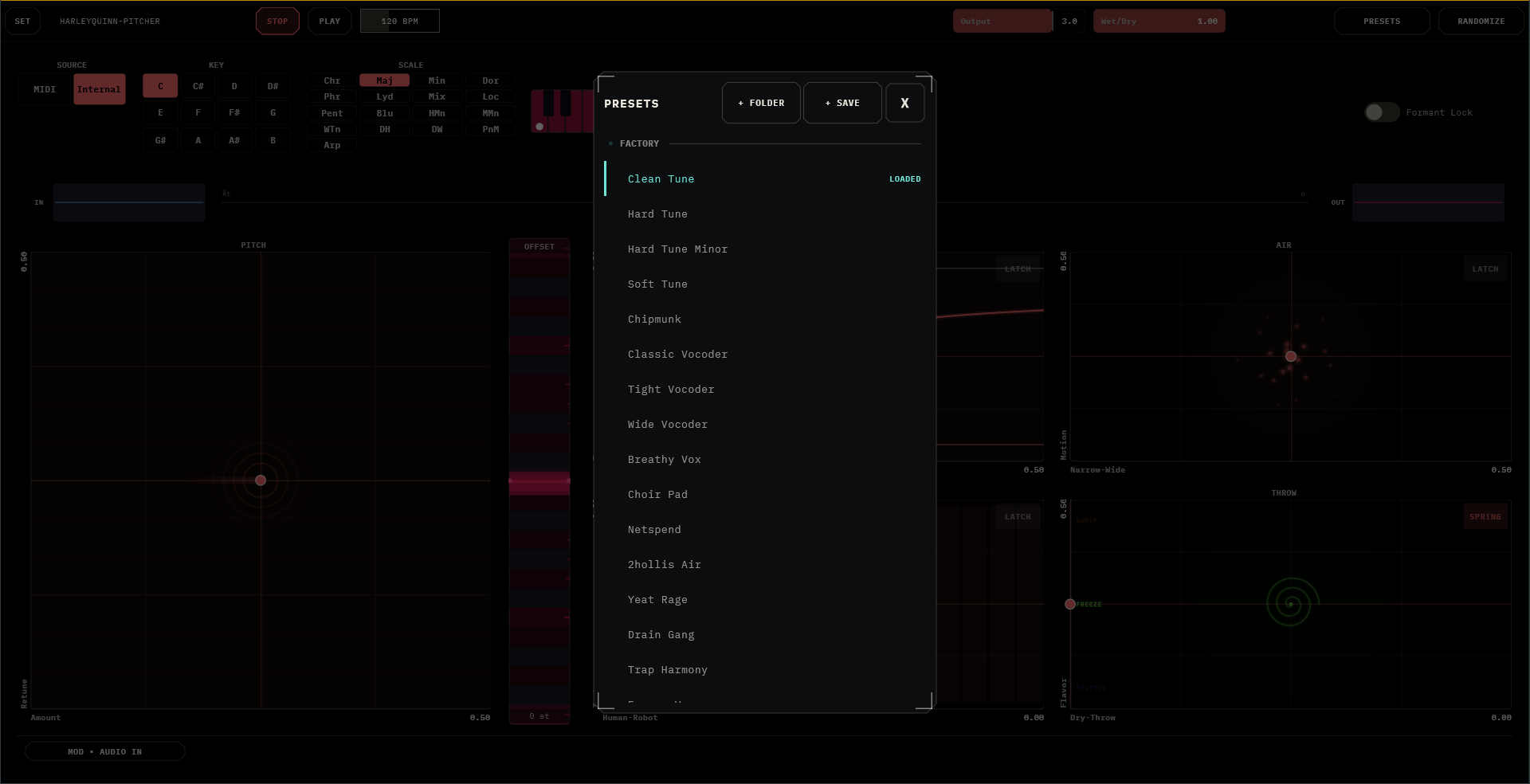
Presets drive the pads, so stepping through them animates the whole surface.
RANDOMIZE rolls a new, sane patch: a fresh key and scale, tasteful correction, a dice-roll of the macros. It never touches your TTS setup, and it keeps Auto Gain on so surprises stay level.
Settings & Standalone
SET opens Settings, License, and About: five surface themes (Dark through Void and Warm), colour presets, four accent swatches, and UI scale with auto-fit. The standalone opens fullscreen with its own STOP/PLAY/BPM transport — that's there so bar-locked TTS loops and tempo-synced stutters work with no DAW in sight. F11 toggles fullscreen.
HarleyQuinn-Pitcher runs a 14-day free trial, fully functional; the pill counts it down. Afterwards, the effect politely steps out of the signal path for a few seconds each minute — your track keeps playing dry — until it's fed a license.
Under the Hood
The macros are the intended interface, but everything they drive is also a real parameter in your DAW's generic view: vocoder band count, attack and release, sibilance; carrier oscillator levels, detune, and breath; formant shift; the whole distortion, de-esser, multiband, and doubler chain; and the sound-design families behind THROW and VOICE — granular, stutter, frequency shifter, vowel filter, resonator, spectral tools. Automate them if you know what you're doing — but know the macros ride many of them continuously, and the pads always win the argument.
The plugin reports ~35 ms of latency to your DAW, which compensates automatically. Mono or stereo in, stereo out, no sidechain.
Recipes
1 · The modern hook
Hard Tune preset. KEY to your song, SCALE Maj or Min. Retune at the top, Amount full. Sing plainly — the tune does the styling. OFFSET +3 or +7 on a doubled take for the harmony stack.
2 · The classic robot
SOURCE to MIDI. VOICE pad fully right. Hold chords on the track's MIDI while speaking — not singing, speaking — into the mic. The chords do the singing; Texture (Y) picks which robot you are.
3 · The instant record
Clean Tune. BITE at one o'clock (a little glue, a little drive), AIR up and to the right (wide, moving). That's a produced lead vocal in two gestures — the rest of the mix can catch up later.
4 · The throw
Set THROW's flavor mid-height (freeze). On the last word of a phrase, slam X right and release — the word freezes, smears, and springs back to dry before the next line. One finger, and it lands on the grid every time.
5 · The ghost singer
MOD • TTS. Type a line. Pick a voice from a country you've never been to. Loop 4 bars, SOURCE MIDI, play slow chords. The plugin now features a guest vocalist who works for free and never misses a session.
6 · The needle drop
TTS in Manual mode with a long phrase. Scrub chip on PLAY. Drag the waveform and flick — the phrase rolls on at your flick's speed and decays like a turntable. Record the gesture with GEST and it performs itself while you get back to the pads.
Field Notes
- Nothing seems to happen? VOICE at the left edge is a pure tuner — with clean, in-key input, correction is supposed to be invisible. Check the snap readout; if it says
E4 → E4, you're simply in tune. Congratulations? - It goes quiet-ish for 5 seconds every minute? Not quiet — dry. The trial has ended; the pill knows.
- GENERATE is greyed out? This build has no voice models on board — the slim build hides no secrets, it just can't speak.
- My wide stereo vocal got narrow? Input is mono-folded by design. Rebuild the width with AIR — it makes better stereo than the original had anyway.
- The THROW pad won't stay where I put it? It's in SPRING. Tap the corner badge.
- MIDI notes aren't retuning my voice? They never will — MIDI plays the carrier. The scale retunes the voice. Two different jobs.
- Vocoder sounds thin? Feed it. The vocoder wants consonants and breath — get closer to the mic, or raise Texture, or blend a touch of Human back in.
- Latency when monitoring live? ~35 ms is real. Monitor through your interface on the way in; let the DAW compensate on playback.