Launchpad
A performance sampler wearing an 8×8 grid — the screen and the Novation Launchpad Mini MK3 are the same instrument, so play whichever your hands are on. Four colour-coded banks, each its own sampler and step sequencer: slice a breakbeat across sixteen pads, load a kit of one-shots, record audio straight in, and mangle the lot through two master effects. Built for hands, lights, and loops.
Quick Start
No hardware needed:
- Load the plugin (standalone opens fullscreen; F11 toggles it). The 8×8 grid shows four coloured quadrants.
- Tap
IMPORT, point the browser at a folder of loops (once — it remembers), tap a break. It slices across Bank A automatically. - Click pads — slices play. Drag across pads and the slices fire in sequence and record into the sequencer as you go.
- Press play. Your drag is now a pattern.
With a Launchpad Mini MK3: plug it in and launch the standalone — the hardware lights up in the four bank colours and every pad, LED, and flash mirrors the screen. In a DAW, see The Hardware for routing.
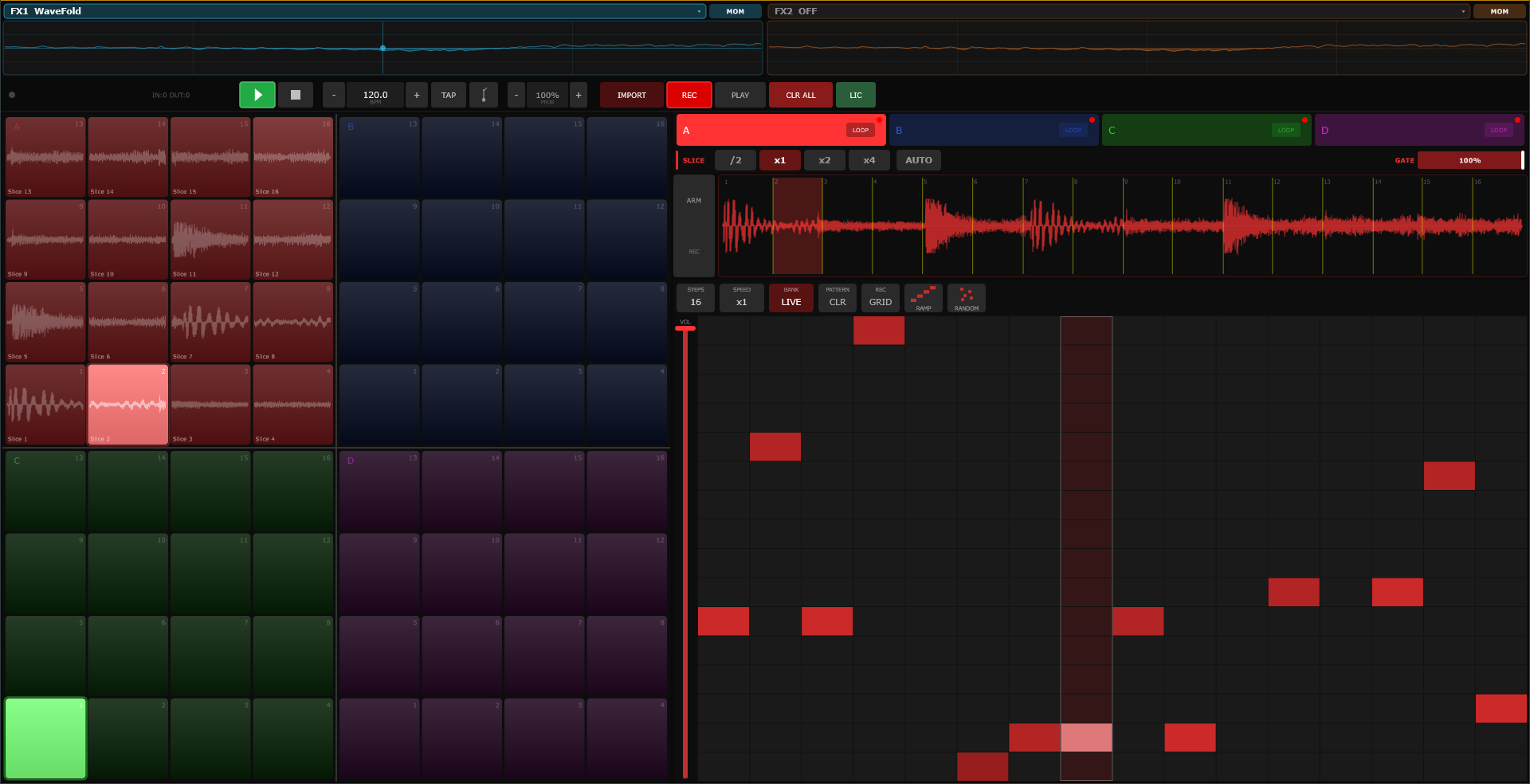
The Machine
- FX strip
- (top) — two XY effect pads on the master bus, FX1 into FX2, with a live scope glowing behind each. See The FX Strip.
- Transport bar
- hardware connection dot with IN/OUT counters, play/stop, BPM with TAP tempo, the metronome, PROB, IMPORT, REC (arms step-recording on all four banks at once), the PLAY · SILENT · MON output switch, CLR ALL (wipes every pattern — samples survive), and the license pill.
- The grid
- (left) — Bank A red top-left, B blue top-right, C green bottom-left, D magenta bottom-right. Pads show waveform thumbnails of what they hold.
- Bank panel
- (right) — the selected bank's tabs, slice toolbar, waveform, and step sequencer with its volume fader.
Output modes: PLAY is everything; SILENT mutes the sequencer so you can jam over nothing; MON mutes your live taps so you can write patterns without hearing your own fingers.
The Four Banks
Each bank is an independent sampler-and-sequencer pair with one of two personalities, toggled by the LOOP/PADS chip on its tab:
- LOOP
- one audio file sliced across the sixteen pads (the default). Slicing is automatic: sixteen equal slices, or tap AUTO for transient-detected cuts that land clean. The
/2 · x1 · x2 · x4buttons re-divide — finer divisions give you shorter slices from the front of the loop. One slice plays at a time, so a chopped break never smears over itself. - PADS
- sixteen independent one-shots, polyphonic, sharing the 32-voice pool. Kits, hits, impacts.
The GATE fader on the slice toolbar is the bank's sustain — pull it down and slices choke short, up and they ring their full length.
Pads & Gestures
- Tap / click
- trigger. Vertical position is velocity: top of the pad is a ghost note, bottom is an accent. Real dynamics, one axis.
- Drag-through
- (LOOP banks) — sweep a finger across pads to fire slices in sequence, recording into the sequencer as you go, trail fading behind you. Up to four simultaneous drags, one per quadrant — two hands, four breaks.
- Right-click / long-press
- open the sample browser (the whole loop for a LOOP bank, that one pad for a PADS bank).
- Drop files
- one file onto a pad loads that pad; several files fill consecutive pads from where you dropped them.
Everything mirrors on the hardware LEDs in real time: dim = empty, lit = loaded, bright = playing right now.
The Step Sequencer
One per bank, up to 128 steps, with its own speed (×2 to ×¼ — one bank can halftime while another doubles), its own volume, and its own on-air toggle. Rows are pads, columns are steps: click to toggle, drag to paint, right-click a cell to set its velocity by height.
- GRID / FREE
- recording mode. GRID snaps your live taps to the step grid, drum-machine style. FREE records raw time — hits land as markers exactly where you played them, playhead a continuous line — and flipping back to GRID quantizes the take. Feel first, tidy later.
- REC
- (transport bar) — master record: arms all four banks' step-recording at once, so a two-handed jam across quadrants is captured everywhere.
- RAMP
- fills a rising diagonal, an instant melodic run across the pads.
- RANDOM
- scatters one random pad per step.
- PROB
- the honest description: below 100%, steps don't skip — they fire on a random pad instead. It's not a humanizer, it's a controlled-accident dial. At 90% your break stutters interestingly; at 50% it's free jazz.
The FX Strip
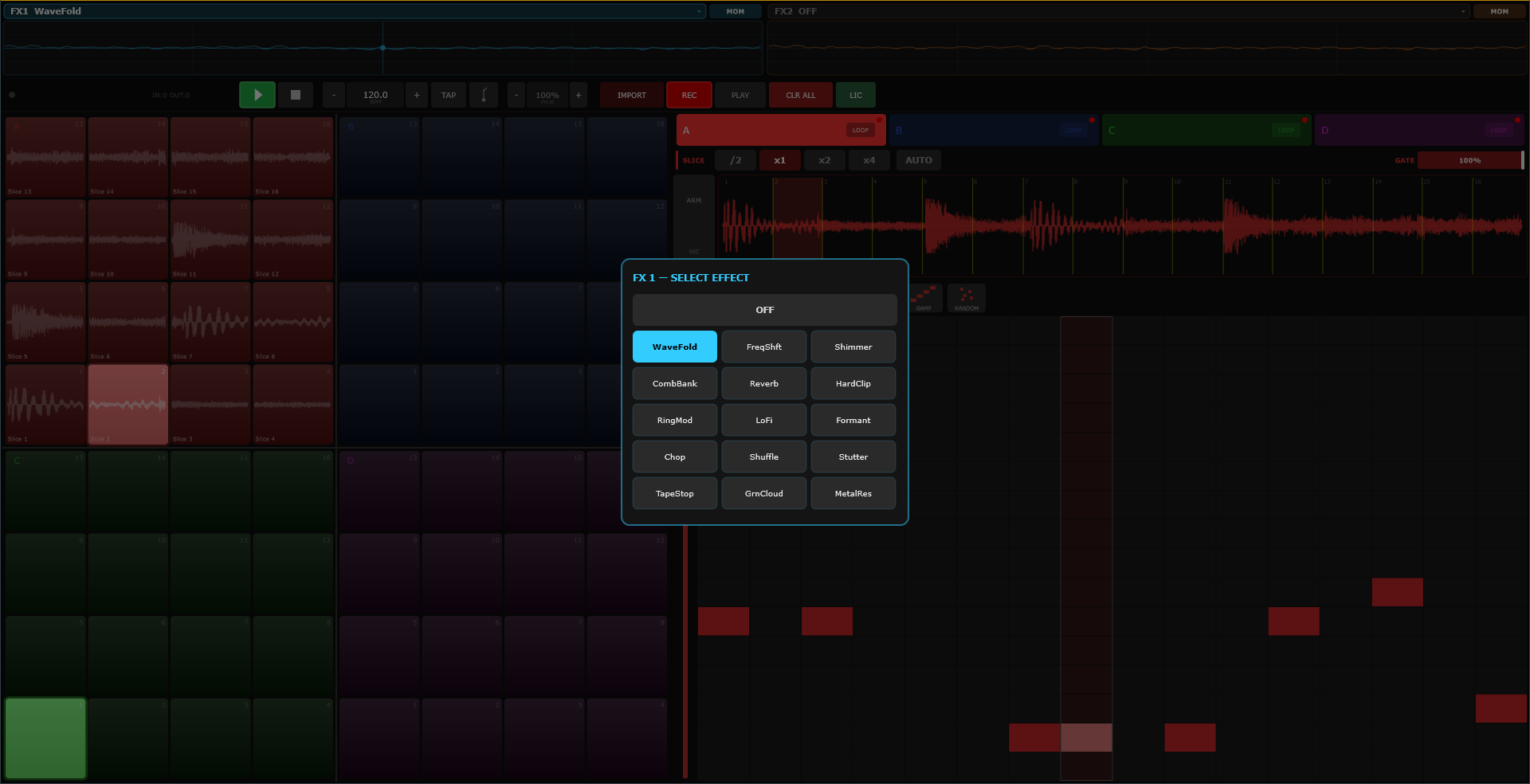
Two XY pads across the top of the window, on the master bus, FX1 (cyan) into FX2 (orange). Tap the name to pick from fifteen effects — folders of destruction from WaveFold and HardClip through Shimmer, CombBank, TapeStop, Stutter, and a granular cloud — or OFF. Each pad is MOM (only while touched — the stab) or LATCH (stays where you left it — the shape). The live waveform glows behind the crosshair so you can see what you're doing to the mix while you do it.
FX settings are performance state — they reset with the session, on purpose. Yesterday's TapeStop is not tomorrow's problem.
Loading & Recording Audio
The browser — IMPORT (or a right-click) opens the folder browser: point it at your sample folder once with FOLDER..., and from then on it's tap-name-to-load, tap-the-triangle-to-audition. Each bank remembers where it was browsing. WAV, AIFF, MP3, FLAC, OGG.
Recording in — the ARM button beside the waveform captures live input, up to 60 seconds:
- On a LOOP bank: arming waits for the sequencer to wrap to step one, records exactly one pattern-length, and slices the take across the pads automatically. Play a phrase, get an instrument.
- On a PADS bank: arm, then tap the pad you want the take to land on.
The input is never monitored through the plugin — monitor through your DAW or interface, then commit the take.
The Hardware
Standalone (and the TouchMachines Liveset)
Plug in a Launchpad Mini MK3 and launch: the plugin takes the hardware directly, switches it to full-RGB mode, and paints the four quadrants in their bank colours. Pads are velocity-sensitive; every trigger, flash, and drag-trail renders on the LEDs.
The hardware's side and top buttons drive the machine:
- Scene buttons (right column): the bottom four select banks A–D; the top four toggle each bank on-air. The lit LEDs show which banks are live.
- Top row (the arrow/mode buttons), acting on the selected bank: cycle step count · cycle speed · toggle on-air · clear pattern · toggle step-record · reset to step one.
In a DAW
The DAW owns the hardware, so route MIDI: Launchpad hardware → the plugin's track. Use a linear-chromatic Custom Mode (note 36 at bottom-left, +1 per column, +8 per row) — the plugin maps notes 36–99 onto the grid by physical position. Hardware pads play with real velocity and auto-select their bank on screen.
For LEDs in a DAW, route the plugin's MIDI output back to the hardware on a second track — you'll get playing-state feedback (lit while sounding). The full colour show is a standalone/Liveset luxury.
Licensing
Launchpad runs a 14-day free trial, fully functional — the pill in the transport bar counts it down, and afterwards the demo goes briefly quiet each minute until licensed. Tap the pill to enter a key.
Recipes
1 · A break in thirty seconds
IMPORT a breakbeat into Bank A. Tap AUTO — the transients become sixteen clean pads. Drag a diagonal across the quadrant. Press play. That drag is now a beat, and you have twenty-nine seconds left over.
2 · The four-bank rig
A: a sliced break. B: a sliced vocal or bassline. C: a kit of kicks and snares. D: impacts and FX. Give each sequencer a different step count — 16 / 12 / 8 / 7 — and the four loops braid into a polymeter that arranges itself while you perform on top.
3 · Controlled accidents
Write a tight pattern. Pull PROB to 85%. Every pass, a step or two lands on the wrong pad — which, in a sliced break, means the right pad you hadn't thought of. Pull it lower until it stops being your pattern at all.
4 · Capture and chop
Mic or guitar into your interface. ARM on a LOOP bank — it records exactly one pattern-length starting on the top of the loop, then slices itself playable. Your voice is now sixteen pads.
5 · Feel first, tidy later
Sequencer to FREE. Play the pattern live, rushing and dragging like a human. Keep the take. When it's right, flip to GRID and the machine squares it up — or don't flip, and keep the push.
6 · Two hands, two effects
Loop playing. Left hand rides FX1 (WaveFold, MOM) for stabs of fold; right hand parks FX2 (TapeStop, LATCH) and brakes the whole mix into a corner on the phrase turn. Release both on the downbeat. Take a bow.
Field Notes
- Hardware silent?
- Something else owns the Launchpad's MIDI port — one host at a time. Unplug, replug, relaunch.
- Hardware plays but no lights (DAW)?
- You're missing the LED return route — plugin MIDI out, back to the hardware.
- Sequencer running but silent?
- Check the output switch (SILENT? MON?), the bank's on-air toggle, its volume fader, and whether the pads actually hold samples.
- Slices click?
- Use AUTO — it cuts at silent points. Equal division cuts wherever the math lands.
- Recording never starts?
- Loop-bank recording waits for step one. Arm before the top of the pattern.
- Drag-through not recording?
- It's a LOOP-bank gesture — PADS banks don't auto-sequence from drags.
- Samples vanished after switching LOOP/PADS?
- That toggle clears the bank — it warned you here first.
- Velocity is the top-to-bottom axis.
- Ghost notes live at the top of the pad. Use them; drummers do.